Welcome aboard our PokerShip beginner’s guide! If you’ve just heard whispers of PokerShip, an exciting new online card-game app, you’re in the right place. In this friendly walkthrough, we’ll explain step-by-step how to download and set up the app, create your PokerShip account, and navigate the game tables. You’ll learn how to use PokerShip’s interface and master the essential gameplay basics. By the time you reach the bottom of this guide, you’ll feel confident jumping into your first game. Let’s chart the course together!
Table of Contents
TogglePokerShip Beginner Guide: Getting Started on the App
First things first: let’s get PokerShip up and running on your device. PokerShip is designed to work on both iOS and Android, so whether you have an iPhone, Android phone, or tablet, you can easily download the app.
Here’s how to begin:
- Download and Install: Open Google Play or the Apple App Store and search for PokerShip. Install it like any other app.
- Launch the App: Open PokerShip and head to the welcome page.
- Check for Updates: Update the app when prompted to ensure you have the smoothest gameplay experience.
- Log In or Register: If you’re new, tap Sign Up. If you already have an account on another device, simply log in using your existing details.
Once you’re logged in, the main lobby appears. This is your command center: you’ll see options for game formats, tables, menus, settings, and more. Tap around to explore, PokerShip keeps the layout simple and beginner-friendly.
How to Use the PokerShip App
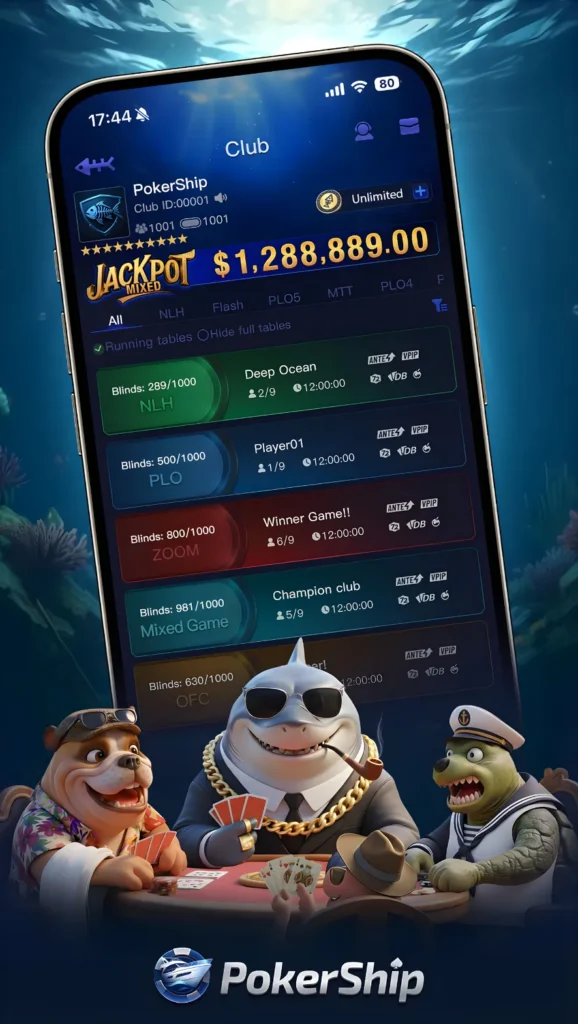
The PokerShip interface is designed to be intuitive:
- Navigation Menu: Switch between Home, Games, Profiles, or other sections.
- Game List: Shows a variety of table formats, each with different styles and player counts.
- Profile Section: Customize your avatar, adjust preferences, or review your stats.
- Chat/Inbox: Stay connected with friends or view messages if the app includes these features.
At a table, you’ll find neatly placed action buttons, your cards, and community cards if the game mode uses them. The interface handles all dealing and turn-taking automatically, letting you focus on decisions and enjoying the experience.
PokerShip Account Setup: Creating Your Account
Setting up a PokerShip account is quick and straightforward:
- Tap “Sign Up” on the opening screen.
- Enter Basic Info: Provide your email, create a password, and choose a username.
- Verify Email/Phone: Complete the quick verification step for account safety.
- Customize Your Profile: Choose an avatar, set display preferences, and personalize your identity at the tables.
PokerShip may also include optional security features, such as identity confirmation, to ensure account integrity. This is typically a one-time step to keep your profile protected.
After setup, explore the lobby, review the various game formats, and adjust settings to your comfort level.
PokerShip Gameplay Basics: A Tutorial for Beginners
Now that your account is ready, let’s learn how the games work! PokerShip mainly follows classic rule sets similar to widely known card-game formats. The most popular one is usually Texas Hold’em, so we’ll use that as the baseline.
Understanding Hand Rankings
In Texas Hold’em:
- You receive two private cards (hole cards).
- Five community cards are placed on the table.
- You form the strongest five-card hand using any combination of the seven cards available to you.
Here are the hand rankings from strongest to weakest:
- Royal Flush
- Straight Flush
- Four of a Kind
- Full House
- Flush
- Straight
- Three of a Kind
- Two Pair
- One Pair
- High Card
Knowing these rankings helps you understand when your hand is strong or when it may be better to step aside for the round. PokerShip often offers quick references or guides inside the app if you ever need a refresher.
The Round Structure: Flop, Turn, and River
A Texas Hold’em round includes:
- Pre-Flop: You receive your two cards and decide your first move.
- Flop: Three community cards are revealed.
- Turn: A fourth community card appears.
- River: The fifth and final card is shown.
- Showdown: Remaining players reveal their cards, and the strongest hand wins the pot for that round.
PokerShip automatically handles the order of play, turn indicators, timers, and card dealing.
Game Modes on PokerShip
Common game formats you may find include:
- Casual Tables: Relaxed environments perfect for beginners.
- Tournaments: Structured events with a fixed number of participants.
- Sit & Go’s: Quick-start mini-events that begin once enough players join.
- Practice Tables: Ideal for learning without any pressure.
Exploring these different modes helps you discover your favorite style of play.
Common Card Game Terms
Here are a few essential terms you’ll encounter:
- Blinds: Required contributions from specific seats to start the action.
- Check: Choose not to take action when allowed.
- Call/Continue: Match the current round’s level of participation.
- Raise (In Non-Monetary Terms): Increase participation level in the round.
- Fold: Leave the current round.
- Pot: The central collection of chips for that round.
- Kicker: Extra card used to break ties.
Each of these terms becomes easier with practice.

Getting Comfortable at the Table
A few simple beginner tips:
- Start slow with a selective range of hands.
- Observe how others play before deciding your style.
- Play from later positions more confidently since you get more information.
- Don’t feel pressured to participate every round, patience is helpful.
- Learn from each hand, win or lose.
PokerShip Tips and Strategies for Newcomers
When you’re just stepping into the PokerShip world, things can feel a little fast-paced. But don’t sweat it, every pro once sat exactly where you are now. The key is easing into the gameplay and letting your confidence grow naturally. Here’s a more detailed look at the strategies you listed, explained in a beginner-friendly way:
Start on Low-Pressure or Practice Tables
Before jumping into intense multiplayer rooms, it’s smart to warm up on practice-oriented tables. These spaces are designed to help new players experiment without any pressure.
You can get a feel for:
- How the interface works
- How turns rotate
- How different card combinations work together
Since there’s no urgency, you can focus on learning rather than trying to make quick decisions. Think of it as training wheels for your gameplay journey.
Use Tutorials and App Help Menus
PokerShip includes built-in learning sections that gently walk you through everything from card rankings to table flow.
Taking a few minutes to explore:
- Interactive tutorials
- Rule explanations
- Pop-up hints
- Beginner walk-throughs
…can make a world of difference. These tools are there to help you shorten your learning curve and avoid confusion when the action starts.
Play Aggressive with Stronger Starting Cards
New players often jump into too many hands just to stay active. But here’s the thing, selective participation increases your chances of making smart decisions.
Choosing solid starting cards gives you:
- A stronger foundation
- Fewer tricky situations
- More clarity when the community cards appear
It’s like choosing your battles. When starting hands are better, decision-making gets easier and more enjoyable.
Stay Calm Through Ups and Downs
Poker, no matter the platform, naturally involves changing outcomes from round to round. Some hands will feel great, others won’t.
The trick? Don’t let short-term results throw you off.
Keeping a level head helps you:
- Make smarter choices
- Avoid rushed reactions
- Maintain consistent gameplay
Treat each round as a fresh start instead of dwelling on the previous one.
Pay Attention to the Community Cards
A big part of smart play is understanding how shared cards affect your hand.
Ask yourself:
- Do the community cards improve my hand?
- Do they help others at the table more than they help me?
- What potential combinations are forming on the board?
By reading the table, you become more aware of what’s realistically possible and what’s too risky to pursue.
Breaks are well deserved
Poker can be exciting but every now and then you might need a brief break to use the restroom or grab a snack. Taking short breaks is a feature on Pokership that many other apps don’t offer. Take a breather and keep your seat!
Frequently Asked Questions
Q: What is PokerShip?
A: PokerShip is an online poker app where players enjoy various formats.
Q: How do I create a PokerShip account?
A: Open the app, tap Sign Up, enter basic details, verify your contact method, and customize your player profile. Contact bluffingmonkeys.com 24/7 live chat to join a club.
Q: Does PokerShip work on both Android and iOS?
A: Yes, you can find it on both major app stores.
Q: What games are available on PokerShip?
A: Most commonly, Texas Hold’em style tables, PLO variants, tournaments, Sit & Go formats, and even blackjack!
Q: Can beginners start easily?
A: Absolutely, PokerShip’s clean interface and beginner-friendly tables help new players learn quickly.
Conclusion
Congrats, you’ve completed the PokerShip beginner guide! You now know how to download the app, set up your profile, navigate the interface, understand hand rankings, follow round structure, and play smarter through simple strategies.
PokerShip makes the experience smooth, friendly, and enjoyable for newcomers. Dive into practice tables, explore different game types, and grow at your own pace. With patience and consistency, you’ll soon feel right at home at the tables.
Enjoy your journey, and may every round bring you valuable experience!